Napkin API Documentation
Transform your text into beautiful, professional visuals with the Napkin API. Our powerful visual generation engine helps you create stunning diagrams, illustrations, and graphics programmatically from simple text descriptions.
About Napkin
Napkin is an AI-powered visual creation platform that helps you communicate ideas more effectively. With Napkin, you can instantly transform your text into engaging visuals, diagrams, and illustrations that make your content more memorable and impactful.
Napkin API
The Napkin API brings the power of Napkin's visual generation engine to developers, enabling you to integrate automatic visual creation into your applications, workflows, and content pipelines. Whether you're building educational platforms, creating content automation tools, or enhancing documentation with dynamic visuals, our API makes it simple to generate professional graphics at scale.
Key Features
- 🎨 Multiple Visual Styles: Choose from 21 built-in professional styles or create custom styles to match your brand
- 🌍 Multi-language Support: Generate visuals in any language using BCP 47 language tags
- 📐 Flexible Formats: Export as scalable SVG, raster PNG, or PPT (PowerPoint).
- 🔄 Variation Generation: Create up to 4 unique visual variations per request
- 🎯 Context-aware: Add context before and after your main content for more meaningful visuals
- ⚡ Fast Processing: Asynchronous processing with status polling for optimal performance
- 🔧 Customization Options: Transparent backgrounds, color inversion, and dimension control

Getting Started
Get Your API Token
To use the Napkin API, you need an API token. First, create an account at app.napkin.ai if you don't have one already. Then follow these steps:
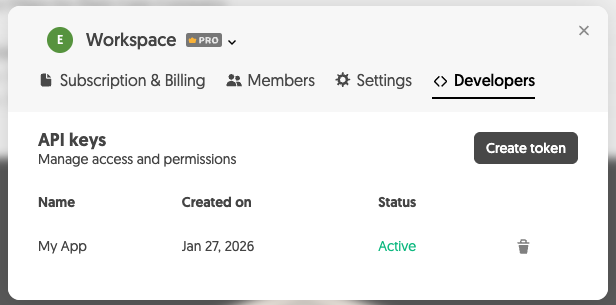
- Go to your Account Settings (or Team Space Settings if you have Team Space enabled)
- Open the Developers tab
- Create a new API token
Pricing and Credits
API usage consumes credits from your Napkin account, the same credits used by the app. Each visual generation request deducts credits based on your plan.
- Credit Balance: Check your remaining credits in your account settings
- Plan Limits: Your API usage is subject to the same limits as your Napkin plan
- Upgrades: Upgrade your plan at app.napkin.ai for more credits
Authentication
Include your token in all requests using the Authorization header:
Authorization: Bearer YOUR_TOKEN_HERE
Rate Limits
Requests to POST /v1/visual are limited per second, per minute, per hour and per day. The numbers depend
on your plan, so read them off the response rather than hard-coding a figure — any answer from that
endpoint that reached its limiter carries them:
X-RateLimit-Limit— requests allowed in the window named byX-RateLimit-WindowX-RateLimit-Remaining— requests left in that windowX-RateLimit-Reset— Unix timestamp when that window resetsX-RateLimit-Window— which window those counts describe:second,minute,hourordayRetry-After— seconds to wait, sent only with arate_limit_exceededrefusal
The status and download endpoints are not rate limited. Need higher limits? Contact us.
How to pace against these headers →
Stability
The API is generally available and supported for production use. Fields and error codes are added without warning, so ignore what you do not recognise; breaking changes are announced in the changelog with the version they land in. What we promise about changes →
API Version
- Current version: 1.2.0
- All API responses include an
X-API-Versionheader with the current version - View changelog →
API Workflow
The Napkin API uses a simple 3-step asynchronous workflow:

1️⃣ Create Visual Request
Submit your text content and preferences to generate visuals.
POST /v1/visual
2️⃣ Check Request Status
Poll the status endpoint until processing completes.
GET /v1/visual/{request-id}/status
3️⃣ Download Generated Files
Once completed, download your visual files using the URLs provided in the status response.
GET <file-url>
Important Notes:
- Complete download URLs are provided in the
generated_filesarray from the status endpoint - Authentication headers are required to download file content
- Files should be downloaded and hosted elsewhere for display - don't use these URLs directly in your application
- Both status and file URLs expire after 30 minutes from generation
Available Styles
Choose from a comprehensive collection of visual styles to match your content and brand:
Built-in Styles
Access 21 professionally designed styles across multiple categories:
- Colorful Styles: Vibrant and energetic designs for bold presentations
- Casual Styles: Relaxed and approachable visuals for informal content
- Hand-drawn Styles: Artistic, sketch-like appearance for creative projects
- Formal Styles: Professional and clean designs for business use
- Monochrome Styles: Minimalist black, white, and gray aesthetics
Custom Styles
Create personalized styles that perfectly match your brand:
- Design custom color palettes and styling at app.napkin.ai
- Copy your unique style ID for use in API requests
- Note: Custom fonts are not supported yet in PPT exports
View all available styles with examples →
Error Handling
Every failed call to a visual endpoint answers JSON with a machine-readable error code and a human-readable message:
{
  "error": "validation_failed",
  "message": "validation failed: format is required; content is required"
}
Branch on error. The codes are stable; the messages are not.
400-invalid_request,validation_failed,invalid_request_id401-token_expired,token_revoked402-no_credits403-missing_authorization,invalid_token,insufficient_scope,forbidden,origin_not_allowed404-not_found405-method_not_allowed410-request_expired413-request_too_large429-rate_limit_exceeded,generation_limit_exceeded,too_many_failed_attempts500-internal_error503-service_unavailable
What each code means, and which are worth retrying →
Best Practices
- Implement Exponential Backoff: When polling for status, increase the interval between requests
- Handle Rate Limits: Pace on the
X-RateLimit-RemainingandX-RateLimit-Resetheaders, and honourRetry-Afteron arate_limit_exceededrefusal, the only429that sends it - Branch on the Error Code: Retry only
internal_error,service_unavailable,rate_limit_exceededandtoken_expired; every other code will still be true on the next call - Cache Results: Store generated visuals to avoid redundant API calls
- Use Appropriate Formats: Choose SVG for scalability, PNG for specific dimensions
- Provide Context: Use
contextfor better visual generation - Language Tags: Always specify the correct language for optimal results
- Tolerate New Fields: The API gains fields and codes without warning; ignore what you do not recognise rather than failing on it
Support
- Documentation Issues: Report to api@napkin.ai
- Technical Support: Include your request ID when reporting issues
Ready to start creating amazing visuals? Create your API token in your account settings and explore the API Reference for detailed endpoint documentation, code examples, and request/response schemas.